

WordPress 7.0 just made AI a lot more interesting.
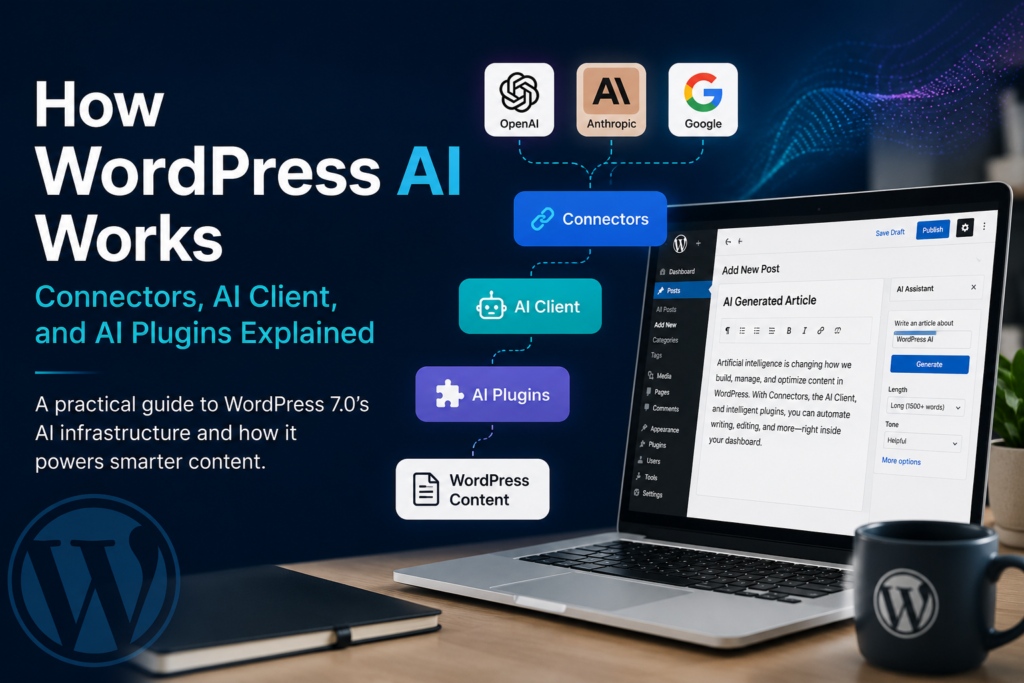
WordPress AI: How Connectors, the AI Client, and AI Plugins Actually Work means you can seamlessly integrate multiple AI providers like OpenAI, Anthropic, and Google through a dedicated Settings → Connectors screen. This feature allows for enhanced customization and functionality, enabling users to leverage diverse AI capabilities directly within their WordPress environment.
But if you’ve already connected an AI provider and expected WordPress to suddenly give you a big “Write my article” button, you may have noticed something:
It doesn’t.
I tested the setup, and that’s because WordPress is separating the AI infrastructure from the actual AI features.
Once you understand that, the whole thing makes a lot more sense.
So what exactly did WordPress add?
WordPress 7.0 introduces two important pieces:
- The Connectors API
- The AI Client
They work together, but they do completely different jobs.
The simplest way to think about it is:
Connectors connect WordPress to AI. The AI Client lets plugins use that AI.
Then a plugin decides what the AI should actually do.
WordPress currently has featured connectors for Anthropic, Google, and OpenAI, which appear under Settings → Connectors.
So WordPress isn’t trying to become another ChatGPT.
It’s building the infrastructure that lets WordPress plugins use AI more consistently.
What are WordPress Connectors?
A connector is basically a connection between your WordPress site and an external service.
For AI, that means connecting your WordPress website to an AI provider.
For example:
WordPress
   ↓
Settings → Connectors
   ↓
OpenAI
   ↓
API key
   ↓
Connected
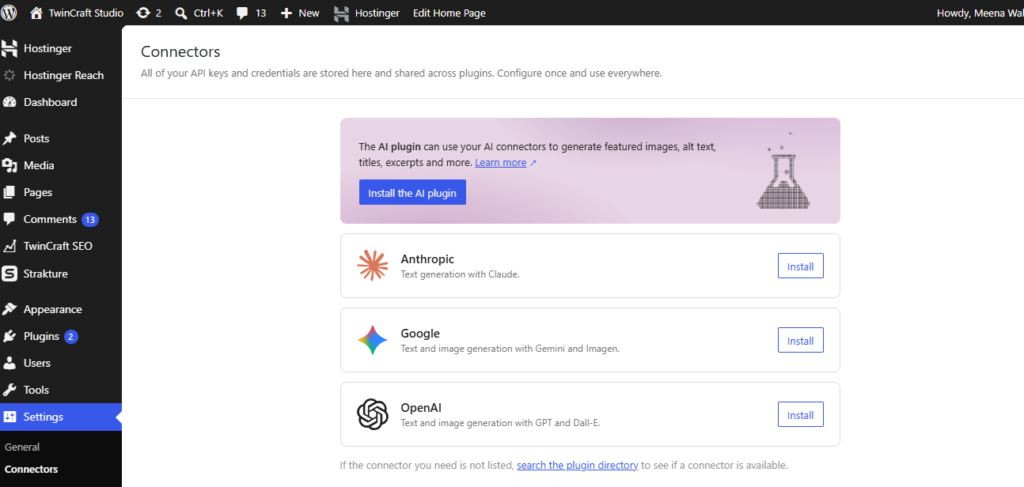
Once you’ve configured the connection, WordPress knows that OpenAI is available.
You can do the same thing with Anthropic or Google.
The interesting part is that plugins using the WordPress AI Client don’t have to build their own API-key management system.
That’s a pretty big deal for plugin developers.
Instead of every AI plugin having its own:
Enter your OpenAI API key
screen, WordPress can provide a central connection layer.
But Connectors don’t write your articles
This is where I think the new system is easy to misunderstand.
You connect OpenAI.
You go back to Posts → Add New.
And then…
Nothing happens.
There isn’t automatically a full article generator.
That’s because Connectors aren’t the article-writing feature.
They’re just the connection.
Think about it like your internet connection.
Having Wi-Fi doesn’t mean Netflix automatically starts playing a movie.
You still need an app that knows what to do with the connection.
It’s the same idea here.
Connector = connection
AI Client = communication layer
AI feature/plugin = actually does something with the AI
Then what is the AI Client?
The AI Client is the interesting part for developers.
WordPress 7.0 includes a provider-agnostic AI Client that lets plugins send prompts to AI models through a consistent interface. WordPress handles routing the request to a suitable configured model.
A plugin can essentially say:
I need text generated for this prompt.
It doesn’t necessarily need to care whether the site owner connected OpenAI, Anthropic, or Google.
That’s handled by the WordPress AI infrastructure.
The basic flow looks like this:
Plugin
   ↓
WordPress AI Client
   ↓
Available AI provider
   ↓
AI model
   ↓
Generated response
   ↓
Plugin
And this is where things get interesting.
A plugin can use this to write a full article
Imagine you install a WordPress plugin that has a simple article generator.
You enter:
Keyword:
best indoor plants for low light
Length:
2,000 words
Tone:
Helpful and conversational
Then click:
Generate Article
The plugin could create a prompt such as:
Write a 2,000-word article about the best indoor plants for low-light rooms. Include an introduction, H2 sections, practical recommendations, and a conclusion. Use a conversational tone.
It sends that prompt through the WordPress AI Client.
The AI provider generates the response.
The plugin gets the response back.
And the plugin can then create a WordPress draft.
So the complete workflow becomes:
Keyword
   ↓
Article plugin
   ↓
Create prompt
   ↓
WordPress AI Client
   ↓
OpenAI / Claude / Gemini
   ↓
Generate article
   ↓
Return content
   ↓
Create WordPress draft
That’s where the actual article generation happens.
Not inside the Connectors screen.
What about the official WordPress AI plugin?
WordPress also has an official AI plugin.
This is where things get slightly confusing.
You can install the plugin, activate it, configure a connector, and expect a complete AI writer.
But that’s not really what the plugin is today.
The official AI plugin provides individual AI-powered features and acts as an implementation of the WordPress AI infrastructure. The available features include things such as AI-assisted titles, excerpts, alt text, images, and other experimental functionality.
So if you installed it and thought:
“Where is the button to generate my entire blog post?”
You’re not missing anything.
The official plugin isn’t currently just a full AI article-writing tool.
That’s an important distinction.
Why did WordPress build it this way?
Because WordPress doesn’t need to build one giant AI writing application.
Instead, it can give developers the basic infrastructure.
Then developers can build whatever they want on top.
One plugin might create an AI writing assistant.
Another might create an AI SEO tool.
Another might generate product descriptions.
Another might generate images.
Another could build an AI content workflow that researches a topic, writes the article, creates images, and publishes the post.
All of them can potentially use the same WordPress AI infrastructure.
That’s much more scalable than WordPress trying to build every AI feature itself.
The AI provider isn’t actually part of WordPress Core
Another detail that’s easy to miss:
WordPress Core doesn’t bundle OpenAI, Anthropic, or Google directly.
Instead, provider integrations are separate plugins.
WordPress’s initial provider plugins include:
- AI Provider for Anthropic
- AI Provider for Google
- AI Provider for OpenAI
This allows the AI ecosystem to evolve without requiring WordPress Core to constantly change whenever an AI provider releases a new model.
That’s a smart approach.
AI changes ridiculously fast.
WordPress Core shouldn’t have to ship a new version every time an AI company changes its API.
What happens when you connect multiple providers?
This is probably one of the coolest parts.
Let’s say a website has:
OpenAI
Anthropic
connected.
A plugin doesn’t necessarily have to force you to use one specific provider.
The AI Client supports model preferences.
A plugin can say:
I’d prefer Claude first, then Gemini, then GPT.
WordPress can check which compatible models are actually available on that site and use an appropriate one.
That means the plugin can be much less dependent on a single AI provider.
For developers, that’s a big advantage.
Who pays for the AI?
This part hasn’t magically become free.
If you’re using OpenAI, Anthropic, or Google through their APIs, the site owner still needs an appropriate account/API access and is responsible for the provider’s usage costs.
WordPress is providing the infrastructure.
It’s not paying the AI bill for you.
So:
Your WordPress site
       ↓
WordPress Connector
       ↓
AI provider API
       ↓
Provider charges for usage
The Connectors API supports API keys from environment variables, PHP constants, or the WordPress database, with defined priority for where credentials are read from.
Why this matters for WordPress plugins
This is where I think the feature becomes much more important than it initially looks.
Before this, an AI plugin might need to build everything itself:
OpenAI integration
Anthropic integration
Google integration
API-key settings
Model selection
Error handling
API requests
Now WordPress can handle much of the underlying infrastructure.
The plugin can focus on the actual feature.
For example:
“Analyze this post and suggest 10 internal links.”
Or:
“Rewrite this introduction.”
Or:
“Generate a 2,000-word article.”
Or:
“Create an image for this article.”
The plugin decides what it wants to accomplish.
The WordPress AI Client handles the communication with the configured AI model.
That’s the real value of the new system.
What does this mean for AI article writers?
It actually makes it easier to build them.
A developer could create a plugin with this interface:
AI Article Generator

Keyword
[ best indoor plants for low light ]

Article type
[ Guide ▼ ]

Length
[ 2,000 words ]

Tone
[ Conversational ▼ ]

[ Generate Article ]
The plugin handles the workflow.
WordPress handles the AI connection.
The AI provider handles the generation.
Then the plugin can take the response and create a WordPress post.
That’s a much cleaner architecture.
But plugins can still have their own prompts
Using the WordPress AI Client doesn’t mean WordPress controls the content strategy.
A plugin can still have its own prompts and instructions.
For example, an SEO plugin could tell the AI:
- Use the target keyword naturally
- Create an SEO-friendly title
- Use H2 and H3 headings
- Add an FAQ section
- Keep paragraphs short
- Avoid repetitive language
- Write in a specific brand voice
WordPress doesn’t decide any of that.
The plugin does.
This is why I wouldn’t look at the new AI Client as a replacement for specialized AI plugins.
It’s more like a foundation they can build on.
The architecture in one picture
Here’s the easiest way to understand the whole thing:
                  WORDPRESS

          ┌────────────────────┐
          │     CONNECTORS     │
          │                    │
          │ OpenAI             │
          │ Anthropic          │
          │ Google             │
          └─────────┬──────────┘
                    │
                    ↓
          ┌────────────────────┐
          │     AI CLIENT      │
          │                    │
          │ Sends prompts      │
          │ Selects models     │
          │ Gets responses     │
          └─────────┬──────────┘
                    │
                    ↓
          ┌────────────────────┐
          │    AI PLUGIN       │
          │                    │
          │ Article generator  │
          │ SEO assistant      │
          │ Image generator    │
          │ Writing assistant  │
          └─────────┬──────────┘
                    │
                    ↓
             WORDPRESS CONTENT
Once you see it this way, the reason you don’t see a “Generate Article” button after connecting OpenAI becomes obvious.
The button isn’t the job of Connectors.
So is WordPress becoming an AI content platform?
Not exactly.
At least not based on what WordPress has released so far.
It’s building the AI plumbing that plugins can use.
And that’s arguably more useful for the WordPress ecosystem.
Instead of having 50 plugins all build their own OpenAI integrations, WordPress can provide a common foundation.
Developers can then spend their time building better AI experiences.
The part I’d watch closely
The really interesting part isn’t actually the Connectors screen.
It’s what developers build on top of the AI Client + Connectors + Abilities API combination.
WordPress 7.0 also integrates the Abilities API with the AI Client, allowing AI-powered workflows to chain abilities together.
That’s where WordPress could move beyond:
“Write some text.”
and toward:
“Research this topic, analyze the existing post, generate an outline, write the article, create an image, add metadata, and save everything as a draft.”
That’s a much bigger idea.
Final takeaway
If you’re experimenting with WordPress AI right now, remember this:
Connectors don’t write your article.
They connect WordPress to AI providers.
The AI Client doesn’t write your article either.
It gives plugins a standardized way to communicate with AI models.
The plugin or AI feature is what decides what the AI should actually do.
So the complete picture is:
Connectors → connect the provider
AI Client → communicate with the provider
AI feature/plugin → tell the AI what to do
WordPress → store and display the result
That’s why WordPress 7.0’s AI changes are more significant than a simple “AI writer” feature.
They’re giving WordPress developers a common AI foundation.
And we’re probably going to see a lot more interesting things built on top of it.
Related reading: actually simplify.